Drop the canonical rules file into your project so your agent can drive the CompCode API correctly on the first try:
curl -O https://api.compcode.ai/CLAUDE.mdIt covers auth, the two-IDs rule, end-to-end recipes (author → assign → quota → simulate → recalc, close-the-month, diagnose-missing-commission), mental-model invariants, and error recovery. Also available as a direct read at api.compcode.ai/CLAUDE.md. See Agent rules file for the full preview.
MCP server: live, two ways to connect. 29 tools cover the full plan lifecycle (author, simulate, assign, quota, recalculate, statements, payroll export), plus the plan-config schema as a resource and guided prompts for the five standard operator flows. Destructive operations carry MCP annotations so your client can gate confirmations.
Remote (recommended, zero install) — point any Streamable-HTTP MCP client at the API:
claude mcp add compcode --transport http https://api.compcode.ai/v1/mcp \
  --header "Authorization: Bearer ws_your_key"
Local (npm) — for Claude Desktop, Cursor, Cline, or offline/dev use: @compcode/mcp
claude mcp add compcode -e COMPCODE_API_KEY=ws_your_key -- npx -y @compcode/mcpOverview
CompCode is a commission management platform with both a dashboard UI and a full REST API. Use whichever fits your workflow, or combine them.
Use the Dashboard for
- Connecting your CRM (OAuth flow)
- Visual plan building with AI assistance
- Reviewing rep earnings and attainment
- Statement approval and team management
- Managing users, roles, and integrations
Use the API for
- Automated plan deployment and versioning
- Bulk operations (assignments, quotas)
- Integration with internal tools and CI/CD
- Custom reporting and data export
- Programmatic simulation and testing
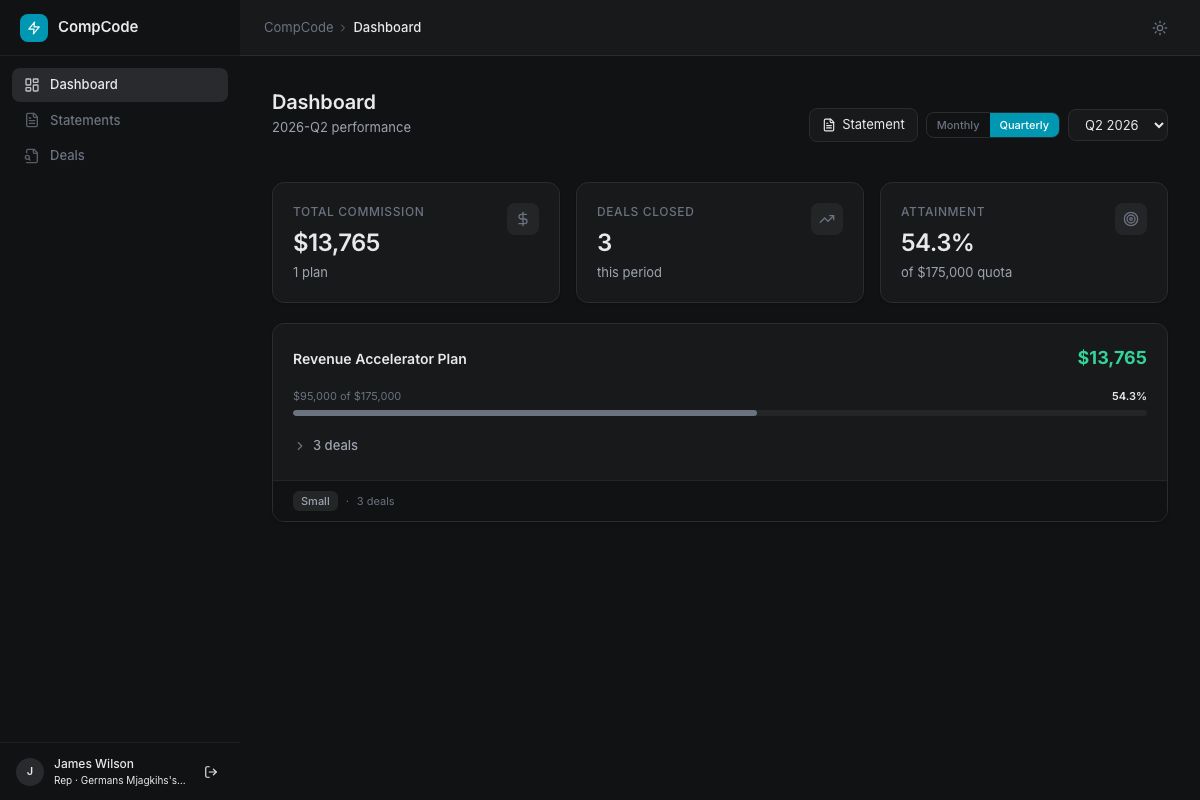
Commission Lifecycle
- Create plan, define rules with measures, tiers, and conditions (UI or API)
- Assign reps, link reps to plans with effective date ranges
- Set quotas, target amounts per rep/measure/period
- Deals close, CRM webhooks trigger automatic calculation
- Review earnings, rep dashboards show real-time attainment
- Generate statements, frozen snapshots for payout approval
Quick Start
Get from zero to calculating commissions in 5 minutes.
Agent quickstart (curl chain)
One copy-paste block for agents driving the API end-to-end. Each step prints IDs needed for the next; capture planId from step 1 and rule_id from rules[0].id.
export COMPCODE_API_KEY=ws_your_workspace_key
BASE=https://app.compcode.ai

# 1. Create the plan
curl -s -X POST "$BASE/v1/plans" \
  -H "Authorization: Bearer $COMPCODE_API_KEY" -H "Content-Type: application/json" \
  -d '{
    "name": "AE Plan 2026",
    "effectiveStart": "2026-01-01",
    "config": {
      "rules": [{
        "name": "Revenue Commission",
        "measure": "closed_won_revenue",
        "executionPhase": "per_deal",
        "attainmentPeriod": "quarterly",
        "tierBy": "attainment",
        "tierMode": "full_rate",
        "tiers": [
          { "tierIndex": 0, "name": "Base",        "minThreshold": 0,    "rate": 0.08 },
          { "tierIndex": 1, "name": "On Target",   "minThreshold": 1.0,  "rate": 0.10 },
          { "tierIndex": 2, "name": "Accelerator", "minThreshold": 1.25, "rate": 0.14 }
        ]
      }]
    }
  }'
# → { plan: { planId, rules: [{ id, ... }] } }
# Capture planId + rules[0].id

# 2. List reps to find IDs
curl -s -H "Authorization: Bearer $COMPCODE_API_KEY" "$BASE/v1/reps"

# 3. Assign reps to the plan
curl -s -X POST "$BASE/v1/assignments" \
  -H "Authorization: Bearer $COMPCODE_API_KEY" -H "Content-Type: application/json" \
  -d '{ "repIds": ["<rep_id>"], "planId": "<planId>", "effectiveStart": "2026-01-01" }'

# 4. Set quota for the rep + rule + period
curl -s -X POST "$BASE/v1/quotas" \
  -H "Authorization: Bearer $COMPCODE_API_KEY" -H "Content-Type: application/json" \
  -d '{ "repIds": ["<rep_id>"], "planRuleId": "<rule_id>", "period": "2026-Q1", "target": 500000, "variableTarget": 25000 }'

# 5. Dry-run simulate BEFORE writing events (hard rule — bad events are sticky)
curl -s -X POST "$BASE/v1/commissions/simulate" \
  -H "Authorization: Bearer $COMPCODE_API_KEY" -H "Content-Type: application/json" \
  -d '{ "planId": "<planId>", "period": "2026-Q1" }'

# 6. Recalculate for real (writes commission events)
curl -s -X POST "$BASE/v1/commissions/recalculate" \
  -H "Authorization: Bearer $COMPCODE_API_KEY" -H "Content-Type: application/json" \
  -d '{ "planId": "<planId>" }'
Full agent rules + diagnose recipes live in api.compcode.ai/CLAUDE.md. The OpenAPI spec at /v1/openapi.json is the source of truth for request bodies.
1. Get your API key
Sign up at app.compcode.ai and connect your CRM. Your workspace API key (ws_xxx) is shown on the dashboard settings page.
curl -H "Authorization: Bearer ws_your_api_key" \
  https://api.compcode.ai/v1/plans
200 Response
[
  {
    "id": "pv_abc123",
    "planId": "plan_xyz",
    "name": "Q1 2026 AE Plan",
    "status": "active",
    "effectiveStart": "2026-01-01",
    "rules": [{ "name": "Revenue Commission", "measure": "closed_won_revenue" }]
  }
]
2. Create a commission plan
Define your commission structure with rules and tiers:
curl -X POST https://api.compcode.ai/v1/plans \
  -H "Authorization: Bearer ws_your_api_key" \
  -H "Content-Type: application/json" \
  -d '{
    "name": "Q1 2026 AE Plan",
    "effectiveStart": "2026-01-01",
    "config": {
      "rules": [{
        "name": "Revenue Commission",
        "measure": "closed_won_revenue",
        "executionPhase": "per_deal",
        "attainmentPeriod": "quarterly",
        "tierBy": "attainment",
        "tierMode": "full_rate",
        "tiers": [
          { "tierIndex": 0, "name": "Base",        "minThreshold": 0,    "rate": 0.08 },
          { "tierIndex": 1, "name": "On Target",   "minThreshold": 1.0,  "rate": 0.10 },
          { "tierIndex": 2, "name": "Accelerator", "minThreshold": 1.25, "rate": 0.14 }
        ]
      }]
    }
  }'
201 Response
{
  "id": "pv_new123",
  "planId": "plan_new",
  "name": "Q1 2026 AE Plan",
  "status": "active",
  "rules": [
    {
      "id": "rule_abc",
      "name": "Revenue Commission",
      "measure": "closed_won_revenue",
      "executionPhase": "per_deal",
      "tierMode": "full_rate",
      "tiers": [
        { "tierIndex": 0, "name": "Base", "minThreshold": 0, "rate": 0.08 },
        { "tierIndex": 1, "name": "On Target", "minThreshold": 1.0, "rate": 0.10 },
        { "tierIndex": 2, "name": "Accelerator", "minThreshold": 1.25, "rate": 0.14 }
      ]
    }
  ]
}
3. Assign reps and set quotas
Assign reps to the plan POST
curl -X POST https://api.compcode.ai/v1/assignments \
  -H "Authorization: Bearer ws_your_api_key" \
  -H "Content-Type: application/json" \
  -d '{ "repIds": ["rep_id_1", "rep_id_2"], "planId": "plan_new" }'
Set quarterly quota POST
measure equals the rule name.
curl -X POST https://api.compcode.ai/v1/quotas \
  -H "Authorization: Bearer ws_your_api_key" \
  -H "Content-Type: application/json" \
  -d '{ "repIds": ["rep_id_1"], "measure": "Revenue Commission", "period": "2026-Q1", "target": 500000 }'
4. Query commissions
When deals close in your CRM, commissions are calculated automatically via webhooks.
# Rep dashboard (earnings, attainment, deals)
curl -H "Authorization: Bearer ws_your_api_key" \
  "https://api.compcode.ai/v1/commissions?repId=rep_id_1"
200 Response
{
  "rep": { "id": "rep_id_1", "name": "Sarah Chen", "email": "sarah@acme.com" },
  "period": "2026-Q1",
  "totalEarnings": 7040,
  "dealsClosed": 3,
  "attainment": 0.85,
  "plans": [
    {
      "planName": "Q1 2026 AE Plan",
      "earned": 7040,
      "deals": [
        { "dealName": "Acme Corp", "amount": 85000, "commission": 6250 },
        { "dealName": "Widget Inc", "amount": 12000, "commission": 790 }
      ]
    }
  ]
}
Authentication
All /api/* endpoints require a Bearer token in the Authorization header.
API Key (recommended for integrations)
Pass your workspace API key as a Bearer token. API keys have full admin access.
curl -H "Authorization: Bearer ws_your_api_key" \
  https://api.compcode.ai/v1/plans
Session Token (dashboard users)
Users authenticated via Google OAuth or Email OTP receive a sess_xxx token scoped to their rep and role.
Request OTP POST
curl -X POST https://api.compcode.ai/auth/otp/send \
  -H "Content-Type: application/json" \
  -d '{ "email": "rep@company.com" }'
Verify OTP → returns session token POST
curl -X POST https://api.compcode.ai/auth/otp/verify \
  -H "Content-Type: application/json" \
  -d '{ "email": "rep@company.com", "code": "123456" }'
200 Response
{
  "sessionToken": "sess_abc123...",
  "rep": { "id": "rep_xyz", "name": "Sarah Chen", "role": "manager" }
}Admin: full access, plans, targets, users, team. Manager: team view, statement approval. Rep: own dashboard and statement only.
Attio Setup
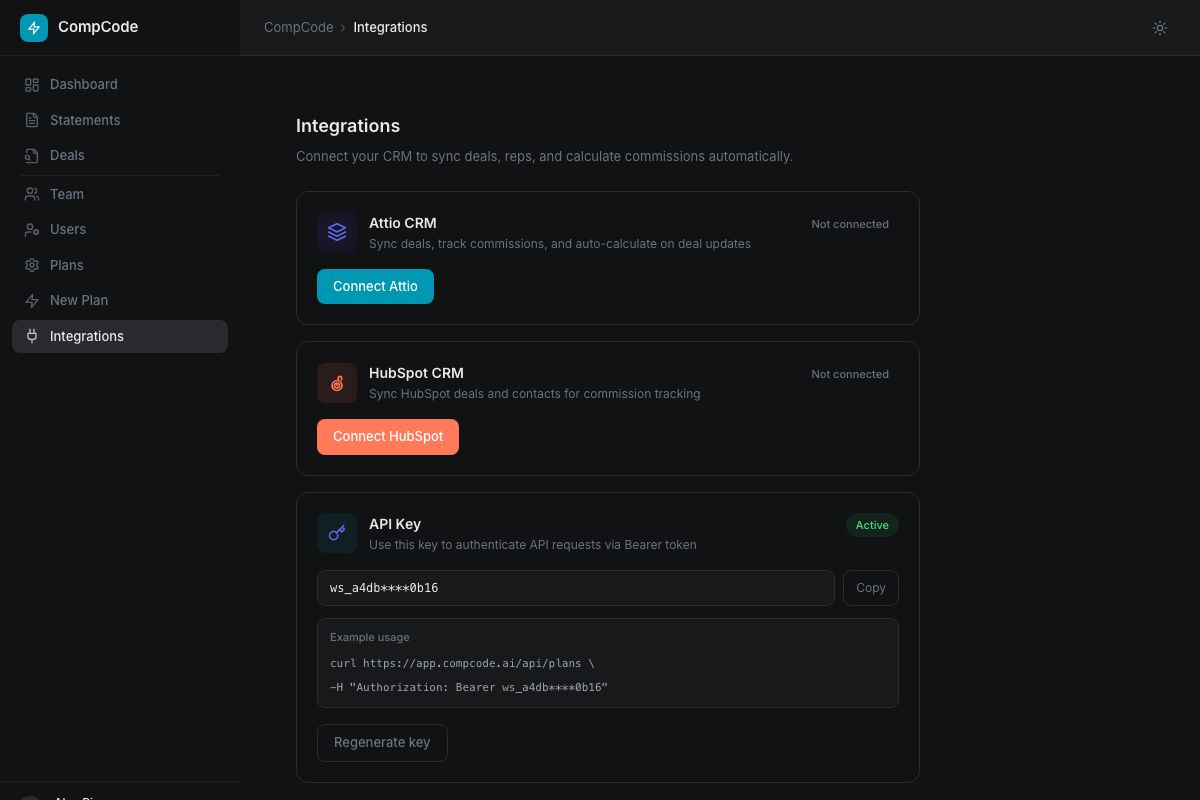
Connect CompCode to Attio to automatically calculate commissions when deals close.
- Connect Attio: Go to app.compcode.ai → Integrations and click "Connect Attio".
- Automatic setup: CompCode registers webhooks for deal changes and syncs your team members and existing deals.
- Field mapping: Deal value, stage, and owner are mapped automatically. Custom fields can be used in plan rules.
- Real-time calculation: When a deal is created or updated, CompCode evaluates plan conditions and calculates commissions.
CompCode is available as an Attio app with an embedded deal widget showing earned/forecast commissions directly on deal records.
HubSpot Setup
Connect CompCode to HubSpot to calculate commissions from your deal pipeline.
- Connect HubSpot: Go to Integrations and click "Connect HubSpot". Authorize via OAuth.
- Permissions required:
crm.objects.deals.read,crm.objects.owners.read,crm.schemas.deals.read - Automatic sync: CompCode syncs deal owners as reps, imports existing deals, and listens for webhooks.
- Token refresh: OAuth tokens are refreshed automatically before expiry.
Webhook events handled
| HubSpot event | What CompCode does | Audit log |
|---|---|---|
deal.creation, deal.propertyChange | Snapshot deal, recalc commissions for the owner | orchestrator.ran outcome: 'processed' |
Owner field change (via deal.propertyChange on hubspot_owner_id) | Reverse old owner's events, write new owner's events | orchestrator.ran outcome: 'owner_changed' |
deal.deletion | Reverse any commission events for the deal, soft-delete the snapshot | orchestrator.ran outcome: 'deleted' |
See Post-close events for the full reversal model (Attio archive is handled the same way).
Salesforce Setup
Connect CompCode to Salesforce to calculate commissions from your Opportunity pipeline.
- Connect Salesforce: Go to Integrations and click "Connect Salesforce". Authorize via OAuth (External Client App) — the instance URL is stored automatically.
- Read on demand: CompCode reads Opportunities and Users directly. Owners sync as reps and existing Opportunities import on connect.
- Sync toggle: Salesforce has no native webhooks, so CompCode polls
LastModifiedDate. Enable or pause polling per workspace viaPOST /auth/workspace/salesforce/sync-enabled(or the toggle on the Integrations page). - Real-time option: For instant recalcs, install a record-triggered Flow that POSTs the changed Opportunity ID to
/webhooks/salesforce— no Apex, no managed package.
Salesforce returns fields in PascalCase (CloseDate, StageName, OwnerId, Amount). CompCode normalizes these into the same field slugs used for Attio and HubSpot, so plan rules stay CRM-agnostic.
See Post-close events for the reversal model — Opportunity stage flips and deletions are reconciled the same way as the other CRMs.
Field Mapping
Field mapping connects your CRM fields to CompCode's calculation engine. The measure field in plan rules must reference a valid CRM field slug.
List CRM fields GET
curl -H "Authorization: Bearer ws_your_api_key" \
  "https://api.compcode.ai/v1/fields/attributes"
200 Response
[
  { "slug": "closed_won_revenue", "label": "Deal Value", "type": "currency" },
  { "slug": "deal_stage", "label": "Stage", "type": "status" },
  { "slug": "deal_type", "label": "Deal Type", "type": "select" },
  { "slug": "close_date", "label": "Close Date", "type": "date" }
]
Get options for a select / status field GET
curl -H "Authorization: Bearer ws_your_api_key" \
  "https://api.compcode.ai/v1/fields/attributes/deal_stage/options"
Auto-match CRM fields POST
curl -X POST https://api.compcode.ai/v1/fields/auto-match \
  -H "Authorization: Bearer ws_your_api_key"
Save custom mapping POST
curl -X POST https://api.compcode.ai/v1/fields/save \
  -H "Authorization: Bearer ws_your_api_key" \
  -H "Content-Type: application/json" \
-d '{ "mapping": { "closed_won_revenue": "hs_deal_amount", "deal_stage": "dealstage" } }'Dashboard
The dashboard at app.compcode.ai is a thin UI on top of the API. Plans are authored by picking a template; everything else (rules, assignments, quotas, simulate, recalc) is done through the API — or through the JSON view on the plan detail page.
Prefer to drive everything programmatically? Jump to Part 2 — Programmatic workflow ↓
Dashboard overview
CompCode's UI deliberately mirrors the API. There is no multi-step plan-builder wizard: plans are authored by picking a template, and every dashboard action has an equivalent REST call documented in Part 2.
Creating a plan
Go to Plans → New plan (/plans/new). The template gallery shows every starter shape — each one is a real POST /v1/plans call you can also run from your terminal, an agent, or the SDK. Pick a template, review the generated config on the plan detail page, and save.
Editing a plan
Click any plan in the list to open the plan detail view. Rules, tiers, and conditions render as human-readable cards on top, with the raw planConfig (cURL, Claude Code, TypeScript) below. The detail page is read-only — changes ship via PATCH /v1/plans/:planId or directly from your editor / agent.
Assignments, quotas, simulate, recalc
All four live in the dashboard nav (Reps & Quotas, Plans, Commissions) and are exposed at the same REST endpoints described in Part 2. Whatever the UI does, the API does.
Statements
See Reviewing & Approving Statements below for the full statement walkthrough — that section is still relevant because the statement review/approval UI is the one workflow that lives meaningfully in the dashboard.
Reviewing & Approving Statements
Once a plan is live and commissions are calculating, statements close the loop: they're a frozen, period-scoped view of a rep's earnings that goes through draft → approved before payroll.
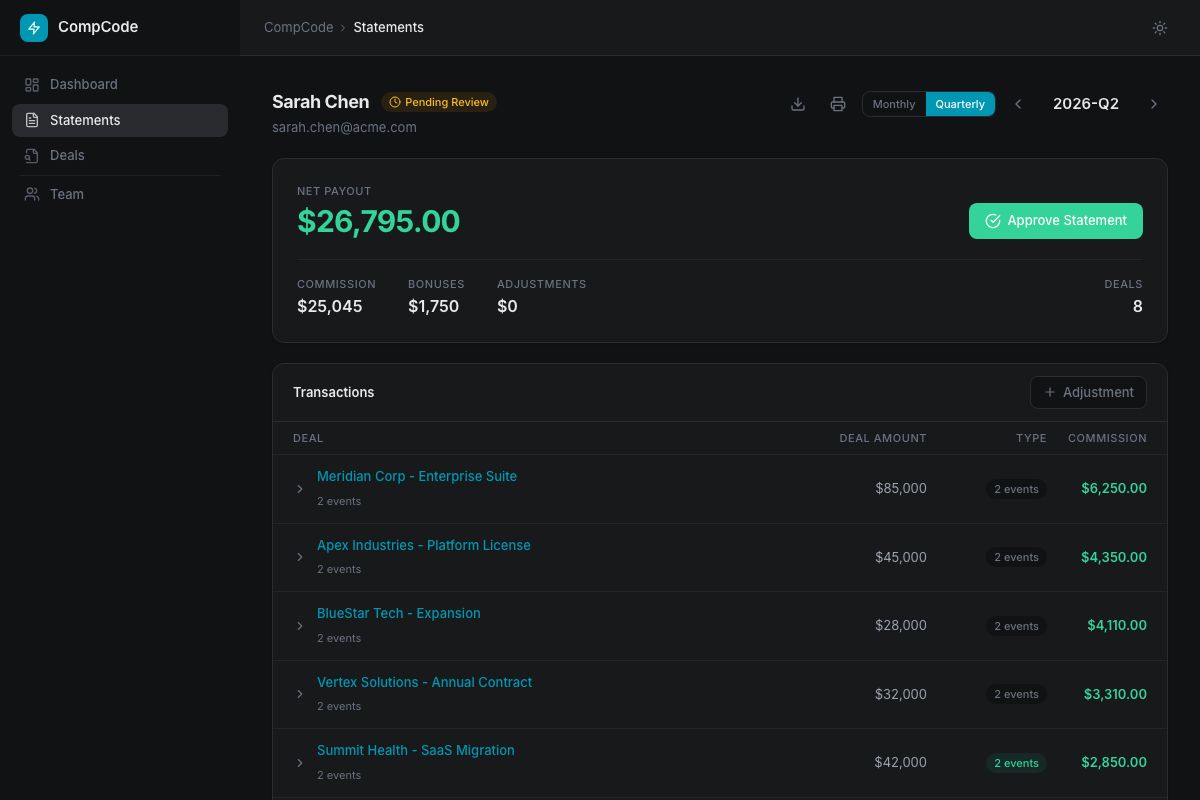
Where to find it
- Your own statement — sidebar → Statement. Reps see their own; managers and admins see a period picker and a rep selector.
- Team view — sidebar → Team Statement (manager/admin only). One row per rep with totals, status, and a link into the detailed statement.
- Period selector — top of every statement page. Switches between monthly and quarterly views matching the plan's
attainmentPeriod.
What's on the statement
- Line items — one row per commission event, grouped by plan rule. Each row shows the deal, the tier matched, the rate applied, and the dollar amount.
- Adjustments — manual entries an admin has added (SPIFs, clawbacks). These are clearly marked and stamped with the adjuster's name + reason.
- Net payout — total commission ± adjustments. This is the number that goes to payroll.
- Status badge — Draft (the orchestrator will keep mutating events) or Approved (locked).
The approval flow
- Generate — opens the current view. If the period changed, click Generate to re-snapshot from the live commission events.
- Review — open each rule, expand line items, sanity-check tier and rate. Add comments inline if anything needs clarification before payroll.
- Approve — clicks the green Approve button. The period locks immediately: the orchestrator will not mutate any events in that period (even on CRM webhook), and the status badge flips to Approved.
- Revert (if needed) — only an admin/manager who approved it can revert via Revert to draft. Once back in draft, the orchestrator resumes mutating on webhook.
Comments
Both managers and reps can add comments on a statement or attach them to a specific deal line. Useful for: explaining a clawback, flagging a deal that needs payroll attention, or documenting why an adjustment was made. Comments are visible to anyone with access to the statement.
Once approved, even a CRM-side change (deal stage flip, amount change, deletion) will not mutate the commission events in that period. The audit log will record orchestrator.ran outcome: 'processed', statementLocked: true and the existing event will stay. To pull in post-close changes after approval, either revert to draft, or click Generate true-up to add a reconciliation event for the delta. See Post-close events.
Programmatic workflow
Every dashboard action in Part 1 also has a REST endpoint. Use these for CI/CD plan deployment, bulk operations, custom integrations, or driving CompCode from Claude Code / agents. Auth: Authorization: Bearer ws_… on every request.
Looking for the dashboard walkthrough instead? ↑ Back to Part 1 — Dashboard workflow
Plan Lifecycle
Plans are stored relationally with full version history:
Plan (identity, name, workspace)
  └── PlanVersion (effectiveStart/End, status)
        └── PlanRule[] (one row per payout component)
              └── PlanRuleTier[] (one row per tier threshold)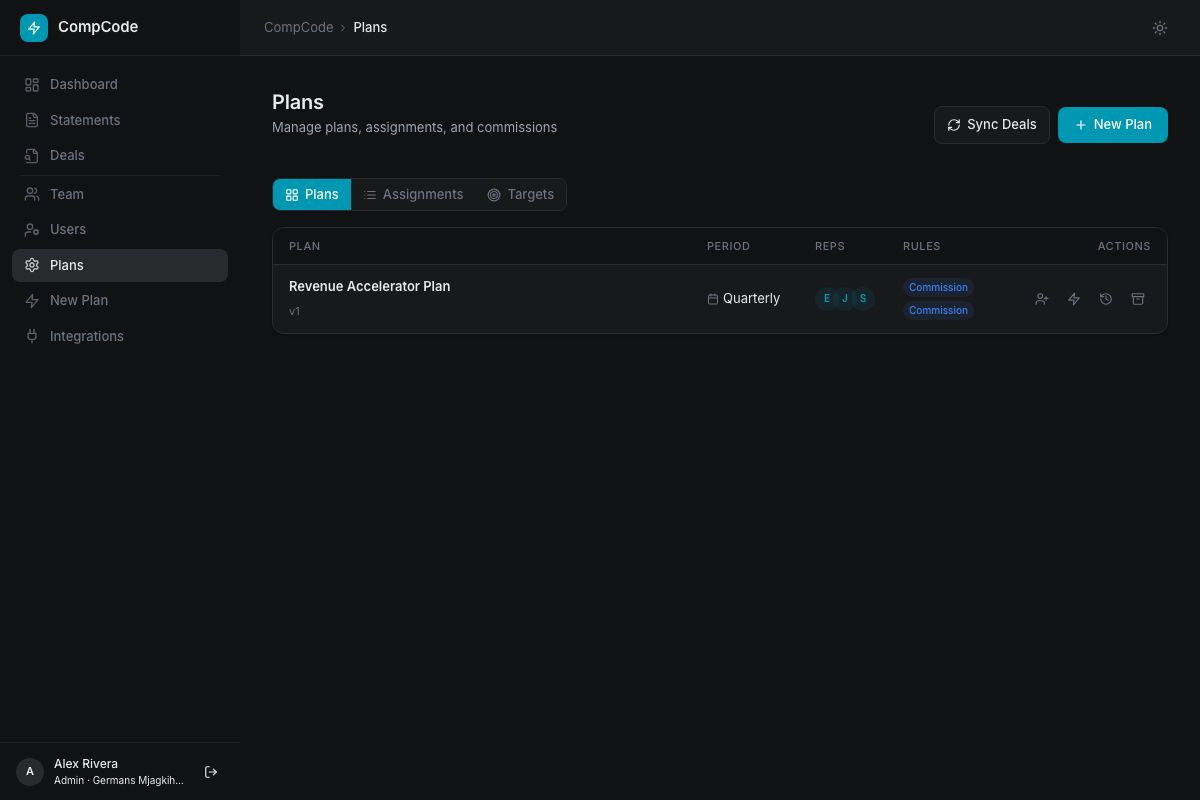
Create
POST /v1/plans, creates a new plan with its first version, rules, and tiers. Requires admin role.
Update (new version)
PATCH /v1/plans/:planId, creates a new version. Previous versions are preserved. Include a changeMessage to document why.
Version history
GET /v1/plans/:planId/history, returns all versions in reverse chronological order.
Archive / Reactivate
PATCH /v1/plans/:planId/status, set status to archived or active.
Delete
DELETE /v1/plans/:planId, permanent deletion. Fails if reps are still assigned.
Rule Configuration
Each plan version contains one or more rules. A rule defines a single payout component.
| Field | Required | Description |
|---|---|---|
name | Yes | Unique rule name, also used as the quota measure identifier |
measure | Yes | CRM field slug to aggregate (e.g. closed_won_revenue) |
executionPhase | No | per_deal (default), cascade, or periodic |
attainmentPeriod | No | monthly, quarterly (default), or annual |
tierBy | No | attainment (default) or value |
tierMode | No | full_rate (default) or marginal |
payoutBase | No | Defaults to measure. Use 1 for flat payouts, variable_target for OTE |
dependsOn | No | For cascade rules, upstream rule name or _total |
capMultiplier | No | Max payout as a multiple of the rep's variableTarget (e.g. 2.0 = at most 2× variable target per fire). Applied after tier math. |
floorAttainment | No | Attainment-ratio gate applied before tier math (e.g. 0.5 = no payout until rep hits 50% quota). |
tiers | Yes | Array of tier definitions (see below) |
Tier structure
| Field | Required | Description |
|---|---|---|
tierIndex | Yes | Sort order (0-based) |
name | No | Display name (e.g. "Base", "Accelerator") |
minThreshold | Yes | For attainment: ratio (1.0 = 100%). For value: raw amount |
rate | * | Commission rate as decimal (0.08 = 8%). Mutually exclusive with flatAmount |
flatAmount | * | Fixed dollar payout. Mutually exclusive with rate |
repId | No | Per-rep tier override. Null = applies to all reps |
* Each tier must have exactly one of rate or flatAmount.
Tier Modes & Payout Types
Execution phases
| Phase | When it fires | Use case |
|---|---|---|
per_deal | On each qualifying deal | Standard revenue commission, SPIF bonuses |
cascade | After upstream rules complete | Manager override (% of team's total) |
periodic | At period close | Quarterly milestone bonus |
Tier modes
| Mode | How it works | Example |
|---|---|---|
full_rate |
Entire base × highest matching tier rate | $100K deal at 120% attainment → $100K × 14% = $14K |
marginal |
Base split across tier bands (tax-bracket style) | First $80K at 8%, next $20K at 10% = $8.4K total |
Examples
// Flat 8% commission on all deals
{
  "name": "Base Commission",
  "measure": "closed_won_revenue",
  "tiers": [{ "tierIndex": 0, "minThreshold": 0, "rate": 0.08 }]
}

// Quarterly milestone bonus
{
  "name": "Quarterly Bonus",
  "measure": "closed_won_revenue",
  "executionPhase": "periodic",
  "attainmentPeriod": "quarterly",
  "payoutBase": "1",
  "tiers": [
    { "tierIndex": 0, "minThreshold": 1.0, "flatAmount": 5000 },
    { "tierIndex": 1, "minThreshold": 1.5, "flatAmount": 15000 }
  ]
}

// Manager cascade (5% of team's commission output)
{
  "name": "Manager Override",
  "measure": "closed_won_revenue",
  "executionPhase": "cascade",
  "dependsOn": "_total",
  "tiers": [{ "tierIndex": 0, "minThreshold": 0, "rate": 0.05 }]
}
Deal Conditions
Conditions filter which deals qualify for a rule. Set at plan level or rule level. Top-level conditions are AND-ed. Use groups for OR logic.
{
  "conditions": [
    { "field": "stage", "fieldType": "status", "operator": "equals", "value": "Won" },
    { "field": "deal_type", "fieldType": "select", "operator": "in", "value": ["New Business", "Expansion"] },
    { "field": "deal_value", "fieldType": "currency", "operator": "gte", "value": 10000 }
  ]
}// OR logic via groups
{
"conditions": [
{
"operator": "or",
"rules": [
{ "field": "region", "fieldType": "select", "operator": "equals", "value": "EMEA" },
{ "field": "region", "fieldType": "select", "operator": "equals", "value": "APAC" }
]
}
]
}Available operators
equals, not_equals, contains, not_contains, in, not_in, gt, gte, lt, lte, between, before, after, in_period, in_last_n_days, is_set, is_not_set, is_true, is_false
Field types
text, number, currency, date, select, status, checkbox, timestamp
Assignments & Quotas
Assignments
Assign reps to a plan POST
curl -X POST https://api.compcode.ai/v1/assignments \
  -H "Authorization: Bearer ws_your_api_key" \
  -H "Content-Type: application/json" \
  -d '{ "repIds": ["rep_1", "rep_2"], "planId": "plan_id", "effectiveStart": "2026-01-01" }'
List assignments GET
curl -H "Authorization: Bearer ws_your_api_key" \
  "https://api.compcode.ai/v1/assignments?repId=rep_1"
Update dates PATCH
curl -X PATCH https://api.compcode.ai/v1/assignments/assignment_id \
  -H "Authorization: Bearer ws_your_api_key" \
  -H "Content-Type: application/json" \
  -d '{ "effectiveEnd": "2026-06-30" }'
Remove assignment DELETE
curl -X DELETE https://api.compcode.ai/v1/assignments/assignment_id \
  -H "Authorization: Bearer ws_your_api_key"
Quotas
Set quota POST
Period format: 2026-Q1 (quarterly), 2026-01 (monthly), 2026 (annual). measure equals the rule name.
curl -X POST https://api.compcode.ai/v1/quotas \
  -H "Authorization: Bearer ws_your_api_key" \
  -H "Content-Type: application/json" \
  -d '{ "repIds": ["rep_1"], "measure": "Revenue Commission", "period": "2026-Q1", "target": 500000 }'
List quotas GET
curl -H "Authorization: Bearer ws_your_api_key" \
  "https://api.compcode.ai/v1/quotas?repId=rep_1"
Commissions
Rep dashboard
GET /v1/commissions?repId=xxx, earnings, attainment, deal breakdown.
Team summary
GET /v1/commissions, team-wide summary (manager/admin only).
Available periods
GET /v1/commissions/periods, all periods with commission data.
Recalculate
POST /v1/commissions/recalculate, full recalculation (admin only). Use after plan changes or field mapping updates.
Sync deals
POST /v1/commissions/sync, pulls all deals from CRM and recalculates.
Statements
Statements are versioned, period-scoped snapshots of a rep's commission earnings. For the dashboard walkthrough (where to find a statement, the approval UI, comments) see Reviewing & Approving Statements in Part 1. The API endpoints below mirror every action available in the UI.
Generate snapshot POST
curl -X POST https://api.compcode.ai/v1/statements/rep_alice/generate \
  -H "Authorization: Bearer ws_your_api_key" \
  -H "Content-Type: application/json" \
  -d '{ "period": "2026-Q1" }'
Get statement GET
curl -H "Authorization: Bearer ws_your_api_key" \
  "https://api.compcode.ai/v1/statements?repId=rep_alice&period=2026-Q1"
Approve or revert POST
Pass "status": "approved" to lock the period, or "status": "draft" to unlock (manager/admin only).
curl -X POST https://api.compcode.ai/v1/statements/rep_alice/approve \
  -H "Authorization: Bearer ws_your_api_key" \
  -H "Content-Type: application/json" \
  -d '{ "period": "2026-Q1", "status": "approved" }'
Add adjustment POST
Blocked once the statement is approved. Use negative amount for clawbacks.
curl -X POST https://api.compcode.ai/v1/statements/rep_alice/adjust \
  -H "Authorization: Bearer ws_your_api_key" \
  -H "Content-Type: application/json" \
  -d '{ "period": "2026-Q1", "amount": 500, "reason": "Spiff bonus for new logo" }'
True-up POST
Adds a reconciliation event for the delta between the approved snapshot and the current live events. Returns requires_approval when the delta exceeds $500.
curl -X POST https://api.compcode.ai/v1/statements/rep_alice/true-up \
  -H "Authorization: Bearer ws_your_api_key" \
  -H "Content-Type: application/json" \
  -d '{ "period": "2026-Q1" }'
Export for payroll GET
CSV by default; pass format=json for the structured shape.
curl -H "Authorization: Bearer ws_your_api_key" \
"https://api.compcode.ai/v1/statements/rep_alice/export?period=2026-Q1&format=csv"Once a statement is approved, the orchestrator will not mutate commission events for any deal in that period — even on CRM webhook (the audit log records orchestrator.ran outcome: 'processed', statementLocked: true and leaves the existing event untouched). To apply post-close changes, either revert the statement to draft or file a true-up.
Simulation
Test commission calculations without writing any commission events — returns the full per-deal trace so you can see exactly what tier each deal would hit and why:
Pass either planId (the server loads the plan config) or an inline planConfig with at least one rule. Period is required; use "all" to simulate every period present in deal snapshots.
curl -X POST https://api.compcode.ai/v1/commissions/simulate \
  -H "Authorization: Bearer ws_your_api_key" \
  -H "Content-Type: application/json" \
  -d '{
    "planId": "your_plan_identity_id",
    "period": "2026-Q2"
  }'
200 Response
{
  "mode": "simulate",
  "totalDeals": 12,
  "eligibleDeals": 8,
  "totalCommission": 47250,
  "assignedReps": 3,
  "results": [
    {
      "dealId": "deal_abc",
      "dealName": "Acme Corp - Enterprise",
      "dealAmount": 75000,
      "dealStage": "closedwon",
      "repId": "rep_123",
      "repName": "Alice",
      "period": "2026-Q2",
      "eligible": true,
      "commissionTotal": 7500,
      "ruleBreakdown": [
        {
          "ruleName": "Revenue Commission",
          "amount": 7500,
          "tierName": "On Target",
          "rateApplied": 0.10,
          "attainment": 1.5,
          "rulePeriod": "2026-Q2",
          "skipped": false,
          "trace": []
        }
      ]
    }
  ]
}
Post-close events
Deals are not "frozen" at first calc. When a CRM deal changes after a commission event has already been written for it, the orchestrator re-runs against the new deal state and mutates the existing event in place. Every run emits an orchestrator.ran entry in the audit log with an outcome tag so you can tell exactly what happened.
What triggers a reversal
- Deal stage flips out of a winning stage (e.g.
closed_won→closed_lost) — the existing event is reversed (amount set to 0, history row written,eventsReversedincremented). - Deal amount or other measure field changes — the event is recalculated and mutated in place (history row written,
eventsUpdatedincremented). - Deal owner changes — the previous owner's event is reversed and a fresh event is written for the new owner. Outcome:
owner_changed. - Deal is deleted in the CRM (Attio archive or HubSpot
deal.deletionwebhook) — any events attributed to the deal are reversed and the snapshot is soft-deleted. Outcome:deleted. - Manual reversal via
DELETE /v1/deals/:dealId— same path as deletion, audited asmanual_reverse.
orchestrator.ran outcomes
| Outcome | Triggered by | Effect on events |
|---|---|---|
processed | Normal calc — webhook or recalc against a deal in scope | Insert or update |
owner_changed | Deal owner changed in CRM (Attio or HubSpot) | Old owner's events reversed, new owner's events inserted |
deleted | Attio archive or HubSpot deal.deletion webhook | All events for the deal reversed; snapshot soft-deleted |
manual_reverse | DELETE /v1/deals/:dealId called by an admin | All events for the deal reversed; snapshot soft-deleted |
Each audit entry includes per-run counters: eventsWritten, eventsUpdated, eventsReversed, eventsNoop, plus a statementLocked boolean.
If the period containing the deal has an approved statement, the orchestrator emits orchestrator.ran with statementLocked: true and leaves the existing event untouched. To apply the change, reject the statement or file a true-up via POST /v1/statements/:repId/true-up.
Example audit-log entry for a deletion
{
  "action": "orchestrator.ran",
  "targetType": "deal",
  "targetId": "deal_abc123",
  "details": {
    "outcome": "deleted",
    "eventsWritten": 0,
    "eventsUpdated": 0,
    "eventsReversed": 1,
    "eventsNoop": 0,
    "statementLocked": false,
    "snapshotSoftDeleted": true
  }
}
Audit log
Every state-changing operation appends an immutable row to the workspace audit log. Read it via GET /v1/workspaces/audit-logs. Switch on action to build diagnostic flows.
Action vocabulary
| Action | Source | Notes |
|---|---|---|
webhook.received | Attio / HubSpot / Stripe webhook | details records provider + eventType |
orchestrator.ran | Engine run (webhook or recalc) | See Post-close events for the outcome vocabulary |
orchestrator.skipped | Engine — no matching plan | Common details.reason: rep not assigned, ghost CRM ID |
plan.created · plan.updated · plan.deleted | /v1/plans CRUD | targetId = plan identity ID |
plan.rep_override.set · plan.rep_override.deleted | /v1/plans/:planVersionId/overrides | Per-rep tier overrides |
quota.set | /v1/quotas | details records target + period |
statement.true_up | /v1/statements/:repId/true-up | Post-approval reconciliation |
role.changed | /v1/reps/:repId | Admin/manager/rep promotion or demotion |
manager.assigned | /v1/reps/:repId | Reporting-line change |
crm.disconnected | /auth/workspace/disconnect-* | details records provider + deletedDeals |
Agent rules file (CLAUDE.md)
CompCode ships a maintained rules file you can drop into any project that uses Claude Code, Cursor, Cline, Aider, or any agent that loads markdown context. It teaches the agent the things that aren't obvious from the API surface alone, including the planId vs planVersionId rule, statement locks, idempotency, period string formats, simulate-before-recalc, and full curl recipes for the five workflows operators actually run.
curl -O https://api.compcode.ai/CLAUDE.mdDrop the file in the root of your project. Set your key: export COMPCODE_API_KEY=ws_your_api_key. Then ask the agent in English.
What's inside
- Connection, base URL, auth header, error envelope shape, link to the machine-readable spec at
/api/openapi.json. - The two-IDs rule,
planId(identity) vsplanVersionId, the #1 source of silent failure. - Five happy-path recipes, author a plan → assign → quota → simulate → recalc; onboard mid-period; close the month; adjust after approval; diagnose a missing commission via the audit log.
- Mental-model invariants, idempotency, current-state events (R9), statement lock semantics, rep matching by email AND CRM ID, quota
current_valuecounter, period string formats, cap/floor semantics. - Hard rules, simulate before recalc, never parallelize within a (rep, period) group, use
capMultiplier/floorAttainmentnot legacycap/floor. - Error recovery table,
plan_rule_not_found,statement_locked,period_mismatch, and others, each with the exact follow-up call.
Direct links
- Read it:
https://api.compcode.ai/CLAUDE.md - Download:
curl -O https://api.compcode.ai/CLAUDE.md - Use with any agent, rename to
.cursorrulesfor Cursor,.clinerulesfor Cline, or load into a system prompt for any other agent.
Build with Claude Code
Use Claude Code to manage your commission plans through natural language.
Setup
- Install Claude Code:
npm install -g @anthropic-ai/claude-code - Set your API key:
export COMPCODE_API_KEY=ws_your_api_key - Drop the CompCode rules file into your project:
curl -O https://api.compcode.ai/CLAUDE.mdThis is the same maintained file documented in Agent rules file. It evolves with the API, so re-pull it if a new release ships.
Example workflows
Each prompt below is a one-shot — paste it into your Claude Code terminal and the agent handles the API calls.
Create a plan
> "Create a tiered commission plan for my AE team: 8% base, 10% at quota,
   14% accelerator on closed_won_revenue, quarterly reset"
Check assignments
> "List all my plans and show which reps are assigned to each"Set quotas
> "Set Q2 2026 quotas for rep_abc at $500K on Revenue Commission"Simulate
> "Simulate what happens if rep_abc closes a $75K deal right now"Generate a statement
> "Generate a statement for rep_abc for Q1 2026 and show the breakdown"Bulk recalculate
> "Recalculate commissions for all reps on the AE plan"Claude Code reads your CLAUDE.md, understands the API structure, and translates natural language into the correct API calls. No need to memorize endpoints or JSON schemas.
All API Endpoints
Base URL: https://app.compcode.ai. All endpoints require Authorization: Bearer {token}.
Plans
| Method | Endpoint | Description |
|---|---|---|
| GET | /v1/plans | List plans |
| GET | /v1/plans/:id | Get plan with rules and tiers |
| GET | /v1/plans/:id/history | Plan version history |
| GET | /v1/plans/templates | List starter plan templates |
| GET | /v1/plans/templates/:templateId | Get a plan template config |
| POST | /v1/plans | Create plan (admin) |
| PATCH | /v1/plans/:id | Update plan, new version (admin) |
| PATCH | /v1/plans/:id/status | Archive or reactivate (admin) |
| DELETE | /v1/plans/:id | Delete plan (admin) |
| GET | /v1/plans/:planVersionId/overrides | List per-rep tier rate overrides |
| PUT | /v1/plans/:planVersionId/overrides/:repId | Set per-rep tier overrides (admin) |
| DELETE | /v1/plans/:planVersionId/overrides/:repId | Remove per-rep overrides (admin) |
Assignments
| Method | Endpoint | Description |
|---|---|---|
| GET | /v1/assignments | List assignments |
| POST | /v1/assignments | Assign reps to plan (admin) |
| PATCH | /v1/assignments/:id | Update dates (admin) |
| DELETE | /v1/assignments/:id | Remove assignment (admin) |
Quotas
| Method | Endpoint | Description |
|---|---|---|
| GET | /v1/quotas | List quotas |
| POST | /v1/quotas | Set quota targets (admin) |
| DELETE | /v1/quotas/:id | Delete quota (admin) |
Commissions
| Method | Endpoint | Description |
|---|---|---|
| GET | /v1/commissions | Rep dashboard / team summary |
| GET | /v1/commissions/dashboard | Team-summary dashboard (manager+) |
| GET | /v1/commissions/periods | List available periods |
| POST | /v1/commissions/recalculate | Trigger recalculation (admin) |
| POST | /v1/commissions/sync | Sync deals from CRM (admin) |
| POST | /v1/commissions/simulate | Dry-run simulation |
| POST | /v1/commissions/cleanup | Admin: remove orphaned events |
| POST | /v1/commissions/reset | Admin: wipe events & snapshots — E2E utility |
Deals
| Method | Endpoint | Description |
|---|---|---|
| GET | /v1/deals | List synced deals (filter by owner / stage / period) |
| DELETE | /v1/deals/:dealId | Admin: reverse events & soft-delete the snapshot (audited as manual_reverse) |
Statements
| Method | Endpoint | Description |
|---|---|---|
| GET | /v1/statements | Get statement (omit repId for team batch view) |
| GET | /v1/statements/export.csv | Export all reps' statements for a period as one CSV (payroll) |
| GET | /v1/statements/:repId/status | Approval status |
| GET | /v1/statements/:repId/export | Payroll export (format=csv default, or json) |
| POST | /v1/statements/generate | Batch-generate for all active reps in a period (COM-188); omit repIds for the whole workspace (manager+) |
| POST | /v1/statements/:repId/generate | Generate snapshot (manager+) |
| POST | /v1/statements/:repId/approve | Approve or revert (manager+) |
| POST | /v1/statements/:repId/adjust | Add manual adjustment (admin) |
| PATCH | /v1/statements/:repId/adjust/:adjustmentId | Edit a manual adjustment (admin) |
| DELETE | /v1/statements/:repId/adjust/:adjustmentId | Delete a manual adjustment (admin) |
| POST | /v1/statements/:repId/true-up | Post-approval reconciliation (manager+) |
| GET | /v1/statements/:repId/comments | List comments |
| POST | /v1/statements/:repId/comments | Add comment |
| DELETE | /v1/statements/:repId/comments/:id | Delete comment |
Reps
| Method | Endpoint | Description |
|---|---|---|
| GET | /v1/reps | List all reps (filter by email) |
| GET | /v1/reps/:id | Get a rep with CRM linkage |
| POST | /v1/reps/sync | Sync reps from CRM (admin) |
| POST | /v1/reps/:id/invite | Send a CompCode login invite to one rep (admin) |
| POST | /v1/reps/bulk-invite | Invite multiple reps at once (admin) |
| PATCH | /v1/reps/:id | Update role or status (admin) |
Workspace
| Method | Endpoint | Description |
|---|---|---|
| GET | /v1/workspaces | Get workspace info |
| PATCH | /v1/workspaces | Update workspace name (admin) |
| GET | /v1/workspaces/keys | Get masked API key (admin) |
| POST | /v1/workspaces/keys/regenerate | Regenerate API key (admin) |
| GET | /v1/workspaces/audit-logs | Audit log (admin) — see action vocabulary |
| GET | /v1/audit-log | Deprecated alias for /v1/workspaces/audit-logs |
Fields
| Method | Endpoint | Description |
|---|---|---|
| GET | /v1/fields | List CRM field attributes |
| GET | /v1/fields/attributes | Deprecated alias for /v1/fields |
| GET | /v1/fields/attributes/:slug/options | Get field options |
| POST | /v1/fields/auto-match | Auto-match CRM fields |
| POST | /v1/fields/save | Save field mapping |
| GET | /v1/fields/current | Get current mapping |
Auth
| Method | Endpoint | Description |
|---|---|---|
| POST | /auth/otp/send | Send OTP code to email |
| POST | /auth/otp/verify | Verify OTP, returns session token |
| GET | /auth/me | Get current user profile |
| GET | /auth/status | Check token validity |
| GET | /auth/workspace/integrations | CRM integration status |
| POST | /auth/workspace/disconnect-attio | Disconnect Attio (admin) |
| POST | /auth/workspace/disconnect-hubspot | Disconnect HubSpot (admin) |
| POST | /auth/workspace/disconnect-salesforce | Disconnect Salesforce (admin) |
| POST | /auth/workspace/salesforce/sync-enabled | Enable or pause Salesforce polling for this workspace (admin) |
Full Swagger UI with "Try it out" functionality: api.compcode.ai/docs
Errors
Every error response uses the same envelope. Switch on code (stable machine string), not on the human message.
{
  "statusCode": 401,
  "code": "UNAUTHORIZED",
  "message": "Missing authorization",
  "details": { "expected": "Authorization: Bearer ws_… or Bearer sess_…" },
  "requestId": "7a9c…"
}
Status & code reference
| Status | Code | Common cause |
|---|---|---|
400 | VALIDATION_FAILED | Validation error — details.errors is the array of class-validator messages. |
401 | UNAUTHORIZED | Missing or invalid Bearer token — details.expected hints at the right format. |
403 | FORBIDDEN | Authenticated but insufficient role (admin/manager required). |
404 | NOT_FOUND | Resource doesn't exist in this workspace. |
409 | CONFLICT | State conflict (e.g. statement already approved, duplicate name). |
429 | RATE_LIMITED | Rate limit exceeded. |
500 | INTERNAL_ERROR | Internal error — requestId is included; quote it when reporting. |
401 Example
{
  "statusCode": 401,
  "code": "UNAUTHORIZED",
  "message": "Missing authorization",
  "details": { "expected": "Authorization: Bearer ws_… or Bearer sess_…" }
}
400 Validation Error
{
  "statusCode": 400,
  "code": "VALIDATION_FAILED",
  "message": "target must be a positive number",
  "details": {
    "errors": [
      "target must be a positive number",
      "repIds should not be empty"
    ]
  }
}
404 Example
{
  "statusCode": 404,
  "code": "NOT_FOUND",
  "message": "Plan not found"
}
Domain error codes
Generic codes above are the HTTP class. These domain codes ride in the same envelope's code field and tell you what the platform actually rejected — and how to recover.
| Code | What it means | How to recover |
|---|---|---|
plan_rule_not_found |
The planRuleId you passed doesn't exist on this plan version. |
Re-fetch the plan and use rules[].id from the response — your reference is probably from a prior version that's been superseded. |
statement_locked |
An approved statement is blocking the write (webhook or manual recalc). | POST /v1/statements/<repId>/approve with {period, status:"draft"}, then retry. |
rep_not_found |
repId doesn't resolve in this workspace. |
GET /v1/reps?email=… first; ask the operator which rep is canonical. |
duplicate_idempotency_key |
A commission event with the same key already exists. | Safe to ignore — the prior write succeeded. |
period_mismatch |
Period string format doesn't match the rule's attainmentPeriod. |
Use YYYY-MM for monthly, YYYY-QN for quarterly, YYYY for annual. |
quota_ambiguous_measure |
The measure shortcut matches a rule on more than one plan the rep is assigned to. |
Re-post with an explicit planRuleId. The error details.plans lists the candidates. |
forbidden |
Authenticated but role check failed. | Plans / quotas / recalc / assignments need admin. Statements need manager or admin. |
FAQ
What is CompCode?
CompCode is an API-first commission management platform with a thin dashboard on top. Plans are structured rules that are versioned, diffable, and deployable via REST — the dashboard exists for spot-checks, statement review, and template-based plan authoring, not as a parallel UI for everything the API does.
How does CompCode calculate commissions?
The rules engine has three execution phases: per_deal, cascade, and periodic. Each rule has tiers with either a rate or flatAmount. Tier selection is by quota attainment or raw value, with full_rate or marginal modes.
Which CRMs are supported?
Attio and HubSpot via OAuth. The engine is CRM-agnostic, additional adapters can be added.
Can I build plans without writing code?
Yes. Pick a template at /plans/new — every starter shape (commission, SPIF, milestone bonus, manager override) is one click to save. Edit the resulting planConfig directly in the JSON view on the plan detail page if you need to tweak it.
Can I use Claude Code to manage plans?
Yes. See the Build with Claude Code section.
How are commissions stored?
Each (deal × rep × plan-rule) combination has at most one row in the commission_events table. That row holds current state and is mutated in place when the deal changes; every mutation is captured in a side history table so you can audit the full event lineage. Reversals (stage flip, owner change, deletion) update the same row and emit an eventsReversed counter — see Post-close events.
Can I simulate before going live?
Yes. Use POST /v1/commissions/simulate — returns full calculations without writing events.
What fields can I use in rules?
Use GET /v1/fields/attributes to discover CRM fields. Use POST /v1/fields/auto-match to auto-map common fields.