Stop recalculating commissions by hand
To calculate a sales commission: multiply the deal value by the commission rate for the rep's current quota attainment tier. For example, a $50,000 deal at a 10% rate equals $5,000 commission. This guide covers every common commission structure (tiered rates, accelerators, flat bonuses, and milestone payouts) with formulas, examples, and how to automate them via API.
The basic commission formula
Every commission calculation, no matter how complex the plan, reduces to one formula: Commission = Deal Value × Commission Rate. The deal value is whatever the rep closed. The rate depends on what the plan says about that rep at that moment. The rest of this guide is just different ways to determine the right rate for a given deal.
A rep closes a $50,000 deal with a 10% commission rate. Their commission is $5,000. Simple, but real-world plans are rarely this straightforward. Most SaaS companies use tiered rates, accelerators, bonuses, and multiple payout components, and you need to combine them into a single payout per deal.
How tiered commission rates work
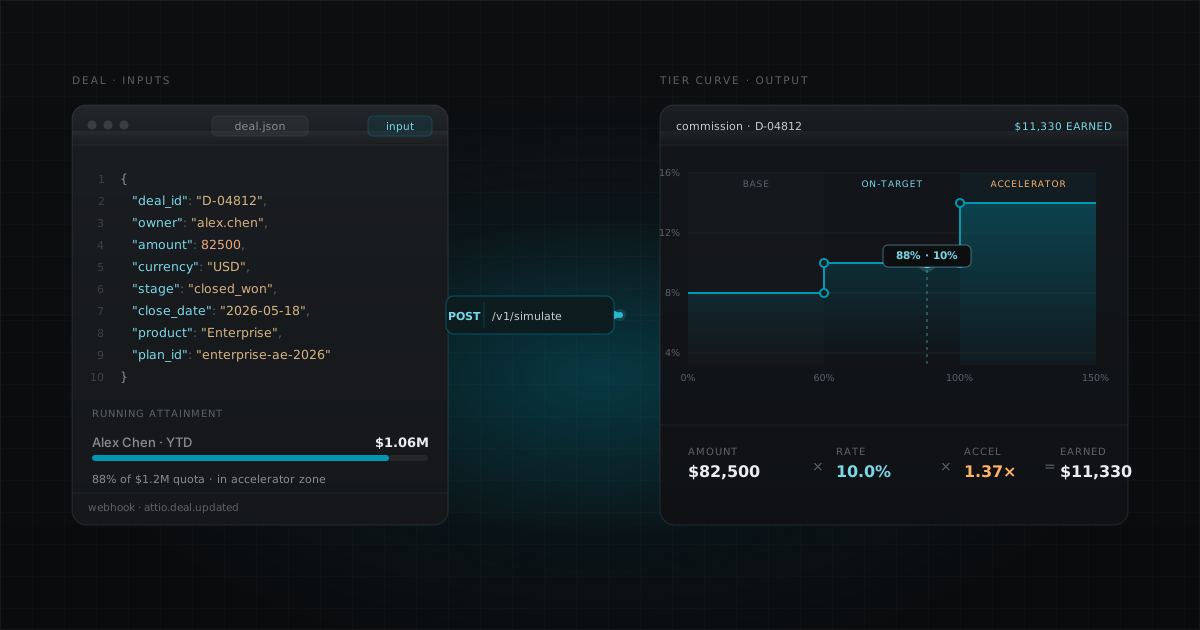
Tiered commission plans pay different rates based on how much of their quota a rep has achieved. The purpose is to incentivize reps to hit and exceed their targets by offering higher rates (accelerators) above quota. Example plan:
| Tier | Attainment Range | Commission Rate |
|---|---|---|
| Base | 0% to 99% | 8% |
| On Target | 100% to 124% | 10% |
| Accelerator | 125%+ | 14% |
How to calculate attainment
Attainment = Total Revenue Closed ÷ Quota Target
If a rep has a $500,000 quarterly quota and has closed $600,000 in revenue, their attainment is 120%. That puts them in the "On Target" tier at 10%.
Full rate vs. marginal tiers
There are two ways to apply tiered rates:
Full rate (retroactive): The rep's entire revenue for the period is paid at the highest tier they have reached. If they hit 120% attainment, all their deals earn the 10% rate, including the ones they closed at the beginning of the quarter when they were below quota.
Marginal: Each portion of revenue earns the rate of the tier it falls within, like tax brackets. The first $500K earns 8%, the next $125K earns 10%, anything above $625K earns 14%.
Full rate is more common in SaaS sales because it is simpler to explain to reps and creates a stronger incentive to push past tier boundaries.
Example: tiered commission calculation
Rep: Sarah. Quarterly quota: $500,000. Revenue closed: $650,000. Plan: full rate tiers (above).
- Calculate attainment: $650,000 / $500,000 = 130%
- Find tier: 130% >= 125% = Accelerator tier (14%)
- Sarah's deal: $75,000 closed today
- Commission: $75,000 × 14% = $10,500
Because Sarah is at 130% attainment, every new deal earns the accelerator rate until the period resets.
How flat bonuses work
Flat bonus plans pay a fixed dollar amount per qualifying deal, regardless of deal value. Common for incentivizing specific deal types (new logos, enterprise accounts, multi-year contracts). The formula is dead simple: Bonus = Fixed Amount × Number of Qualifying Deals.
Example: $1,000 bonus for every "New Business" deal. Rep closes 4 new business deals in Q2 equals $4,000 bonus. Flat bonuses are often combined with tiered rate plans as a second payout component. A rep might earn 10% of deal value PLUS a $500 new logo bonus on the same deal.
How milestone (stepped) bonuses work
Milestone bonuses pay a fixed amount when a rep crosses an attainment threshold. Unlike tiered rates, these are one-time payouts, not per-deal calculations.
| Milestone | Attainment | Bonus |
|---|---|---|
| At Quota | 100% | $5,000 |
| Stretch | 125% | $10,000 |
| President's Club | 150% | $25,000 |
These are non-incremental. A rep at 150% attainment earns the $25,000 bonus, not all three ($40,000). The highest matching tier applies.
How to automate commission calculations
Spreadsheets break when you have more than 10 reps, multiple plan types, or quarterly plan changes. Here is how to automate the whole flow end-to-end without spreadsheets and without a vendor consultant. The same pattern works for any commission tool that exposes a REST API. CompCode does this natively.
Step 1: Define your plan as a structured config
Instead of building formulas in Excel, define your commission plan as data:
{
  "name": "Q2 2026 AE Plan",
  "version": 1,
  "effectiveStart": "2026-04-01",
  "rules": [
    {
      "name": "Revenue Commission",
      "measure": "closed_won_revenue",
      "attainmentPeriod": "quarterly",
      "tierBy": "attainment",
      "tierMode": "full_rate",
      "tiers": [
        { "tierIndex": 0, "name": "Base",        "minThreshold": 0,    "rate": 0.08 },
        { "tierIndex": 1, "name": "On Target",   "minThreshold": 1.0,  "rate": 0.10 },
        { "tierIndex": 2, "name": "Accelerator", "minThreshold": 1.25, "rate": 0.14 }
      ]
    },
    {
      "name": "New Logo Bonus",
      "measure": "deal_count",
      "payoutBase": "1",
      "attainmentPeriod": "quarterly",
      "tierBy": "attainment",
      "tiers": [{ "tierIndex": 0, "minThreshold": 0, "flatAmount": 1000 }],
      "conditions": [
        { "field": "deal_type", "fieldType": "select", "operator": "equals", "value": "New Business" }
      ]
    }
  ]
}
Step 2: Connect your CRM
Commission tools like CompCode connect to your CRM (Attio, HubSpot) via OAuth. When a deal closes, a webhook triggers automatic commission calculation. No manual data entry.
Step 3: Assign reps and set quotas
POST /v1/assignments
{ "repIds": ["rep_sarah", "rep_mark"], "planId": "plan_q2" }

POST /v1/quotas
{ "repIds": ["rep_sarah"], "period": "2026-Q2", "target": 500000 }
Step 4: Commissions calculate automatically
When a deal closes in your CRM, the webhook fires, the commission engine determines the rep's attainment, finds the matching tier, and calculates the payout. Results are queryable via API:
GET /v1/commissions?repId=rep_sarah

# Response includes:
# - Total earnings (YTD, period)
# - Quota attainment percentage
# - Per-deal breakdown with tier, rate, and calculation trace
# - Pipeline forecast
Step 5: Test before going live
Run a dry-run simulation to verify calculations before committing:
POST /v1/commissions/simulate
{
  "dryRun": true,
  "deals": [
    { "deal_value": 75000, "stage": "Won", "owner": "rep_sarah" }
  ]
}

# Returns: exactly what Sarah would earn, which tier applied,
# the full calculation trace, without writing to the ledger
Common commission plan types for SaaS teams
| Plan Type | Payout Mode | Best For |
|---|---|---|
| Tiered rate | rate | AEs with revenue quotas |
| Flat bonus per deal | flat_per_event | New logo incentives, SPIFs |
| Activity-based | flat_per_tier | SDR demo/meeting quotas |
| Milestone bonus | stepped_bonus | Quarterly achievement bonuses |
| Multi-rule (combined) | Multiple rules | AE plans with commission + bonus |
Spreadsheet vs. commission software vs. API
| Spreadsheet | Commission Software | API-First (CompCode) | |
|---|---|---|---|
| Setup time | Hours | Weeks to months | 1-3 days |
| Accuracy | Error-prone | Accurate | Accurate + testable |
| Audit trail | None | UI logs | Immutable ledger |
| Plan changes | Rebuild formulas | Reconfigure UI | PATCH API call |
| Cost (25 reps) | Free | $1,000-4,000/mo | $375/mo |
| Scalability | Breaks at 10+ reps | Good | Good |
| CRM integration | Manual export | Built-in | Webhook-driven |