Commission on Salesforce, nothing installed in your org
Most commission tools that plug into Salesforce want to live inside it: a managed package, Apex triggers, custom objects, and a security review before your admin will touch any of it. Then the plan logic itself still gets configured by hand in a vendor UI.
CompCode takes the opposite approach. It connects from the outside over OAuth, keeps itself current by polling Opportunity changes, and treats the commission plan as a versioned JSON config you manage through a REST API. Your Salesforce org stays untouched.
Why Salesforce commission tracking usually means a spreadsheet
Salesforce records which Opportunities closed and for how much, but it ships no commission engine: no tiers, no accelerators, no quota attainment, no rep statements. Most teams export closed Opportunities to Excel and rebuild plan logic in formulas. CompCode replaces that export with a calculation layer that reads Opportunities directly.
The spreadsheet version fails in predictable ways. Formulas drift from the plan document, a mid-quarter rate change silently applies to the wrong deals, and reps discover their number weeks after the close. The fix is not a better spreadsheet; it is an engine that evaluates the actual plan rules against the actual Opportunity data on every change.
Connect Salesforce with nothing to deploy in your org
The connection is a standard OAuth flow backed by a Salesforce External Client App. You approve access once, CompCode captures your instance URL, and the integration is live. There are no Apex triggers to write, no managed package to install, and no metadata to deploy anywhere in your org.
That matters for two reasons. First, setup does not compete for your Salesforce admin's backlog, since there is no change set to review. Second, disconnecting is equally clean: revoke the OAuth grant and CompCode loses access, with zero leftover components in the org.
How deal changes reach CompCode without webhooks
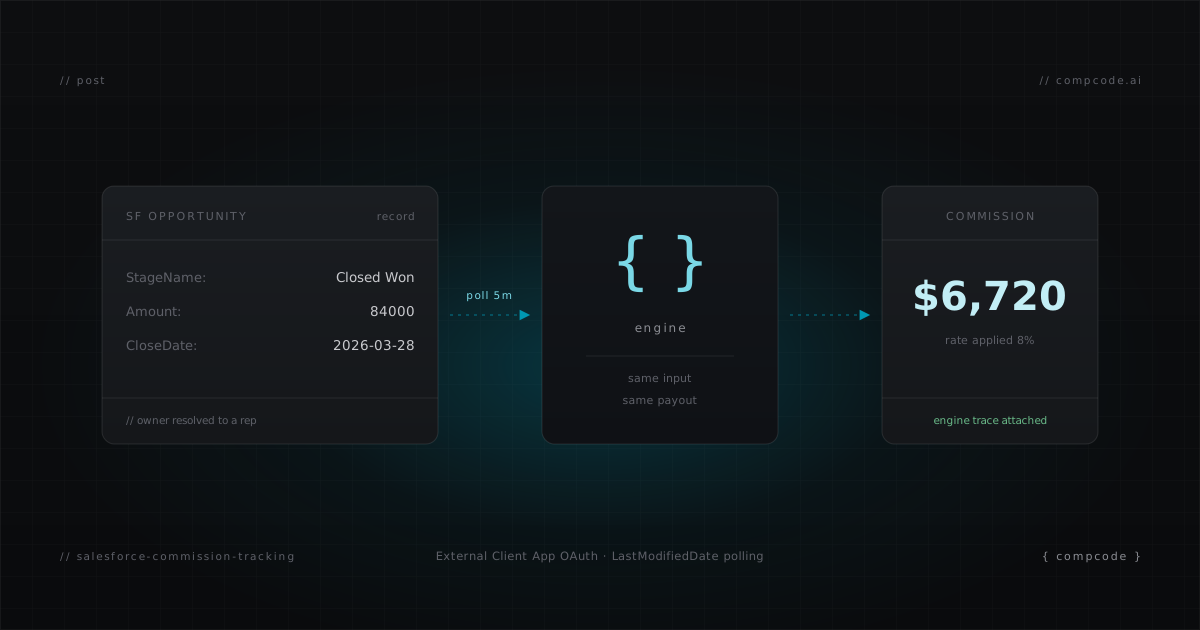
Salesforce does not push events to CompCode. Instead, a sync loop polls your Opportunities by LastModifiedDate and recalculates any deal that changed since the last pass. In practice an edited or closed Opportunity shows an updated commission within minutes, close to real time for how commissions are actually consumed.
Worth being precise about the trade: this is polling, not an event stream, so latency is measured in minutes rather than seconds. What you get in exchange is an integration with zero footprint inside Salesforce. Each changed Opportunity is snapshotted, the owner is resolved to a CompCode rep by email, the assigned plan is evaluated, and the result lands in a history-backed commission ledger.
Set up Salesforce commission tracking in five steps
Connect Salesforce from the Integrations page, let the user and Opportunity sync complete, then build a plan, assign reps with quotas, and dry-run the numbers before anything is written. Each step works from the dashboard or the REST API, so a terminal-first RevOps team never has to leave curl.
- Connect. Choose Salesforce at app.compcode.ai, sign in, approve the OAuth consent. CompCode stores your instance URL and provisions the workspace.
- Sync reps. Salesforce users become CompCode reps, matched by email so Opportunity owners resolve to the right person. Deactivate anyone who should not earn.
- Create a plan as JSON:
curl -X POST https://api.compcode.ai/v1/plans \
  -H "Authorization: Bearer $COMPCODE_API_KEY" \
  -H "Content-Type: application/json" \
  -d '{
    "name": "Enterprise AE 2026",
    "effectiveStart": "2026-01-01",
    "config": {
      "rules": [{
        "name": "Closed Won Rate",
        "measure": "closed_won_revenue",
        "attainmentPeriod": "quarterly",
        "tierBy": "attainment",
        "tierMode": "full_rate",
        "tiers": [
          { "minThreshold": 0,   "rate": 0.08 },
          { "minThreshold": 1.0, "rate": 0.12 }
        ]
      }]
    }
  }'
- Assign and set quotas.
POST /v1/assignmentsputs reps on the plan from an effective date;POST /v1/quotasgives each rep a target, which attainment-tiered rules require. - Simulate before going live.
POST /v1/commissions/simulateruns the real engine as a dry run, writes nothing, and returns a per-rule breakdown with a full engine trace. Compare it against last quarter's spreadsheet, then let the sync loop take over.
More plan shapes, including accelerators and bonuses, are in 5 Commission Plan Examples for SaaS Sales Teams.
Custom Opportunity fields and how they map
Standard Opportunity fields arrive in PascalCase, CloseDate, StageName, OwnerId, and CompCode normalizes them automatically, so plans reference clean field names. Custom fields such as ARR or margin come through the same pipeline and can serve as a measure, a payout base, or a condition in any rule.
Conditions support 20 operators across text, number, currency, date, and picklist types, so "pay 5% on new logo Opportunities above $50k, 2% otherwise" is expressed in the plan config rather than reverse-engineered in a report. If a rule references a field the sync has never seen, simulation surfaces it before any commission is written.
One API surface, whichever CRM you run
Everything available to HubSpot and Attio workspaces is available to Salesforce workspaces: plan CRUD, dry-run simulation, recalculation, statements, and quota management, all over the same REST endpoints. The MCP server exposes the same surface as 29 tools, so an AI agent can manage a Salesforce-backed workspace end to end.
That symmetry is a design decision, not a coincidence. The engine operates on normalized deal data and never sees CRM specifics, which are isolated in adapters. A plan config written against Salesforce Opportunities today would evaluate identically if the same deals lived in another CRM tomorrow, and your automation scripts would not change at all.
What it costs to track commissions on Salesforce
Every feature ships on the Free tier, which supports teams of up to 10 reps: full engine, Salesforce sync, statements, and complete API access without a credit card. Past that, Pro costs $199/month flat for up to 25 reps, adds priority email support, and stays month-to-month with no annual commitment.
A sensible rollout is to run CompCode in parallel with your current spreadsheet for one full period, reconcile the two, and switch once they agree. The Free tier makes that trial cost nothing but the connect time. Pricing details live on the pricing page, and the API reference is in the docs.