Commission API: What It Is, What It Must Cover, and How to Evaluate One
A commission API lets you run sales compensation the way you run the rest of your stack: through code. Plans are structured configs you create and version over HTTP, calculations are triggered and queried programmatically, and month-end close is a script. Most vendors use "API" to mean a reporting endpoint. This guide defines the category properly: the five surfaces a commission API must cover, a three-level maturity model, where the market actually is, and a checklist for evaluating any vendor's claim.
What is a commission API?
A commission API is a programmatic interface for managing sales compensation: creating and versioning commission plans, assigning reps, setting quotas, calculating payouts, and generating statements, all through HTTP calls instead of a vendor's UI. A complete commission API makes the dashboard optional: every operation the UI performs exists as a documented endpoint.
The distinction that matters is write access to plan logic. Nearly every commission platform can answer "what did rep X earn last quarter" over an API. Very few can accept "change tier 2 from 12% to 15%, effective Q3" as an API call. The first is a reporting feed. The second is what makes commission plans behave like the rest of your configuration: diffable, reviewable, deployable, and owned by you rather than trapped in a vendor's click-path.
What must a commission API cover?
Five surfaces: plan configuration (create, modify, version plans as structured data), simulation (dry-run a plan against real deals before writing anything), and calculation events (query what each rep earned, per deal and per rule). Statements cover generate, approve, adjust, export. Data ingestion feeds deals in from your CRM through webhooks or sync endpoints.
In endpoint terms, using CompCode's surface as the reference implementation:
- Plan CRUD and versioning.
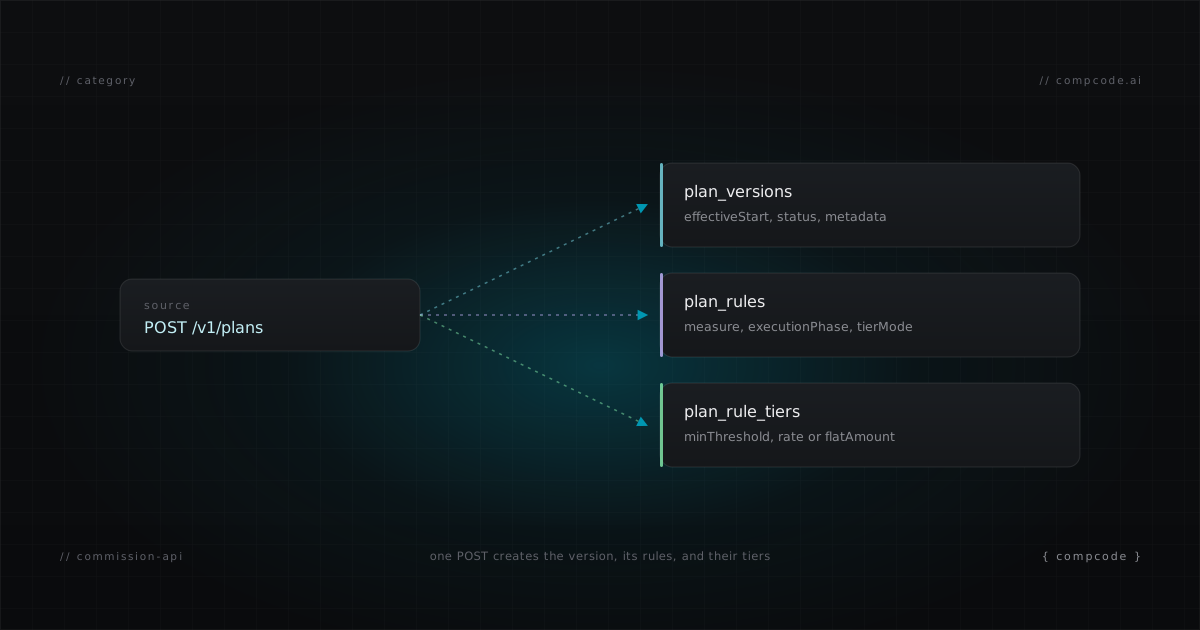
POST /v1/planscreates a plan from a JSON config;PATCH /v1/plans/:idcreates a new immutable version with a change message. Rules, tiers, and deal conditions are all part of the config, not separate UI screens. - Simulation.
POST /v1/commissions/simulatereplays real closed deals through a plan and returns a per-rule breakdown with an engine trace, without writing to the ledger. This is the difference between testing a comp change and hoping. - Calculation events.
GET /v1/commissions?repId=andGET /v1/commissions?dealId=answer the two questions comp admins get asked daily: what did this rep earn, and what did this deal pay.POST /v1/commissions/recalculatereruns the engine after a change. - Statements.
POST /v1/statements/generatesnapshots a period for every active rep in one call; approval endpoints lock the period against further writes; export endpoints hand payroll a CSV. - Data ingestion. CRM webhooks (or polling, where the CRM has no webhooks) push deal changes in, so calculations react to reality instead of waiting for an import job.
Supporting surfaces matter too: assignments with effective dates, quotas per rep and period, an audit log of every engine run, and field metadata from the connected CRM. But the five above are the load-bearing set. A platform missing any of them sends you back to the UI for exactly the work you wanted to automate.
The commission API maturity model
Commission APIs cluster into three maturity levels. Level 1 is read-only reporting: query calculated results, nothing else. Level 2 adds data ingestion: push deals and transactions in, but plans still live in the UI. Level 3 is full plan configuration: create, modify, and version plan logic itself through the API.
| Level | What the API covers | What you can automate | What still requires the vendor UI |
|---|---|---|---|
| 1. Reporting | GET endpoints for calculated commissions and statements | Dashboards, warehouse syncs, payout exports | Everything else: plans, quotas, assignments, corrections |
| 2. Data ingestion | Level 1, plus pushing deals, transactions, or users in | Custom data pipelines into the calc engine | All plan logic: rules, tiers, rates, conditions, effective dates |
| 3. Plan configuration | Levels 1 and 2, plus plan CRUD, versioning, simulation, statement lifecycle | The entire comp workflow: authoring, testing, deploying, closing | Nothing; the UI is one client among many |
The level determines what your team can actually build. At Level 1 you can decorate the vendor's system with reporting. At Level 2 you can feed it. Only at Level 3 can you operate it: put plans in Git, dry-run changes in CI, script month-end close, or hand the workflow to an AI agent. The maturity level is also effectively permanent; vendors whose plan model was designed as UI state rarely retrofit a config API, because the plan structure was never designed to be serialized.
Where is the market in 2026?
Mostly at Level 1. Based on our 2026 audit of 14 vendors' public API documentation, most commission platforms expose read-only reporting endpoints, a smaller group accepts transaction data, and one platform supports full plan configuration through the API. Plan logic on every other platform is created and modified in a proprietary UI.
That one platform is CompCode. The full audit, with per-vendor endpoint inventories and the criteria applied, is published in the State of Sales Comp APIs 2026 report, dataset included. The short version: "has an API" appears on nearly every vendor's integrations page, and on inspection the documented surface is a handful of GET endpoints for pulling calculated results into a warehouse. Useful, but two levels short of what this guide defines as a commission API.
The gap exists for a structural reason, not a temporary one. UI-first platforms store plans as interface state accumulated across screens. Exposing that as a coherent, versionable config would mean rebuilding the data model underneath a live product. API-first platforms made the opposite bet from the start: the config is the product, and the UI renders it.
A working example: create a plan through a commission API
This is what Level 3 looks like in practice. The request below creates a live commission plan with two attainment tiers via CompCode's public API. The response returns a plan identity ID and a version ID; a later PATCH creates a new version and preserves the old one for audit.
curl -X POST https://api.compcode.ai/v1/plans \
  -H "Authorization: Bearer $COMPCODE_API_KEY" \
  -H "Content-Type: application/json" \
  -d '{
    "name": "AE Plan 2026",
    "effectiveStart": "2026-01-01",
    "config": {
      "rules": [{
        "name": "ACV Commission",
        "measure": "closed_won_revenue",
        "attainmentPeriod": "quarterly",
        "tierBy": "attainment",
        "tierMode": "full_rate",
        "tiers": [
          { "tierIndex": 0, "minThreshold": 0,   "rate": 0.10 },
          { "tierIndex": 1, "minThreshold": 1.0, "rate": 0.15 }
        ]
      }]
    }
  }'
From here, the rest of the lifecycle is more calls: POST /v1/assignments to attach reps, POST /v1/quotas to set targets, POST /v1/commissions/simulate to dry-run before anything writes, POST /v1/commissions/recalculate to go live. The whole chain is documented as copy-paste recipes in the agent operator guide and specified in the OpenAPI 3.0 document, 70 operations across 60 paths.
How to evaluate a commission API
Read the API docs before the sales deck. The checklist below separates a real commission API from a reporting endpoint with marketing attached. A vendor that fails the first three questions cannot support version-controlled comp plans, no matter what the integration page says. Ask for the OpenAPI spec; its absence is itself an answer.
- Can I create a plan via API? Not "request a plan setup." A
POSTthat returns a live plan. - Can I modify plan logic via API? Rates, tiers, conditions, effective dates. Some vendors allow one-time creation but require the UI for every edit after.
- Does every change create an immutable version? Activity logs are not versions. You need to diff arbitrary historical states and read a change message for each.
- Is there a dry-run simulation against real historical deals? Without it, every plan change deploys untested against live payouts.
- Are calculation results queryable per deal and per rule? Aggregate totals cannot answer "why is this specific commission wrong."
- Is the statement lifecycle (generate, approve, adjust, export) in the API? If close requires the UI, the API does not cover the workflow that matters most.
- Is there a machine-readable spec? An OpenAPI document means agents and codegen work on day one. PDF "API guides" are a warning sign.
- Does data flow in automatically? CRM webhooks or polling, not scheduled CSV imports.
- Is there an audit log endpoint? Every engine run, queryable, so investigations do not require a support ticket.
- Does the API cover everything the dashboard does? If reps can only be assigned in the UI, the platform is UI-first with an API attached.
Score a vendor honestly against this list and the maturity level falls out: mostly-no is Level 1, yes on ingestion only is Level 2, yes across the board is Level 3.
Commission APIs and AI agents
An AI agent is only as capable as the APIs it can reach. A commission API at Level 3 lets an agent in Claude Code or Cursor author plans, simulate changes, and close the month on an operator's behalf. CompCode also ships an MCP server with 29 tools and an llms.txt so agents can discover the surface without scraping docs.
This is where the maturity model stops being academic. A Level 1 API gives an agent nothing to do but summarize reports. A Level 3 API turns the agent into a comp operator: describe a plan in English, get a validated JSON config, simulate it against last quarter's deals, review the trace, ship it. The end-to-end session workflow is documented in commission tracking from Claude Code, and the tool surface in the MCP server guide.
If you are choosing a commission platform in 2026 and your team already works from AI coding tools, the API level is not one evaluation criterion among twenty. It is the criterion that decides whether the other nineteen can be automated.
Where to start
Pick the path that matches how you evaluate tools. If you evaluate by reading specs, start with the OpenAPI document and the quickstart. If you evaluate by running code, create a plan with the curl example above on the free tier. If you work from an AI coding tool, install the MCP server first.
- Spec readers: the OpenAPI spec and the API quickstart
- Code runners: free tier covers 10 reps with the full engine; the curl example above runs as-is with a workspace key
- Terminal-first operators: manage sales commissions from the terminal covers the daily operations and a scriptable close
- Category context: commission as code covers the adjacent practice of treating plans as versioned configuration, and the 2026 vendor API audit covers all 14 vendors' API surfaces with data
Pricing is public at /pricing. The free tier includes full API and MCP access, which is the point: you evaluate a commission API by calling it.